
If you have been near a news feed since 21 October, you have seen the headlines. Sites went dark, government services were switched off as a precaution, and the flaw turned out to sit in the software underneath about 70 per cent of the web. All of that is true.
Here is the part most of the coverage skipped. The fix lives one layer below anything you can log into. If you run a WordPress site, nothing on your dashboard can close this hole, and an update that feels like a fix is not one.
So here is the story in short, and then the two minute check that decides whether your site is actually covered.
What happened, in short
On 21 October, the PHP project published fixes for two flaws in PHP itself, the software that does the work behind WordPress, Wikipedia and a large share of everything else on the web. The flaws are tracked as CVE-2026-109618 and CVE-2026-109619, and both can let an attacker run code on a server without logging in, as the project’s advisory sets out.
The reaction was immediate. Rather than wait, governments and companies took sites offline, and Australia’s own cyber security website was among them, as the ABC reported. The Australian Cyber Security Centre rated its alert critical, and told organisations to find their PHP, patch it, and watch for anything odd. The same alert notes the flaws may reach back as far as PHP 5, which makes this old code rather than a new mistake.
Attackers were already trying before the fix existed. Cloudflare’s chief executive, Matthew Prince, said the company saw tens of thousands of attempts to exploit the flaw in the 45 minutes after it was announced, rising to millions the next day, the Guardian reported. As of 22 October, nobody had reported a successful break-in. The UK’s cyber agency said it had no reports of successful hacks, and the Australian alert said it was not aware of any exploitation here.
Why updating WordPress will not fix it
A WordPress site stands on three layers. WordPress itself, with your theme and plugins, sits on top. Underneath it is PHP, the software that builds each page and talks to the database. Underneath that is the server, which is almost always rented from a hosting company. The flaw is in the middle layer. Both are rated 9.2 out of 10 for severity, and the industry nickname for the pair, PHP2Shell, describes the goal: a command line on somebody else’s machine.
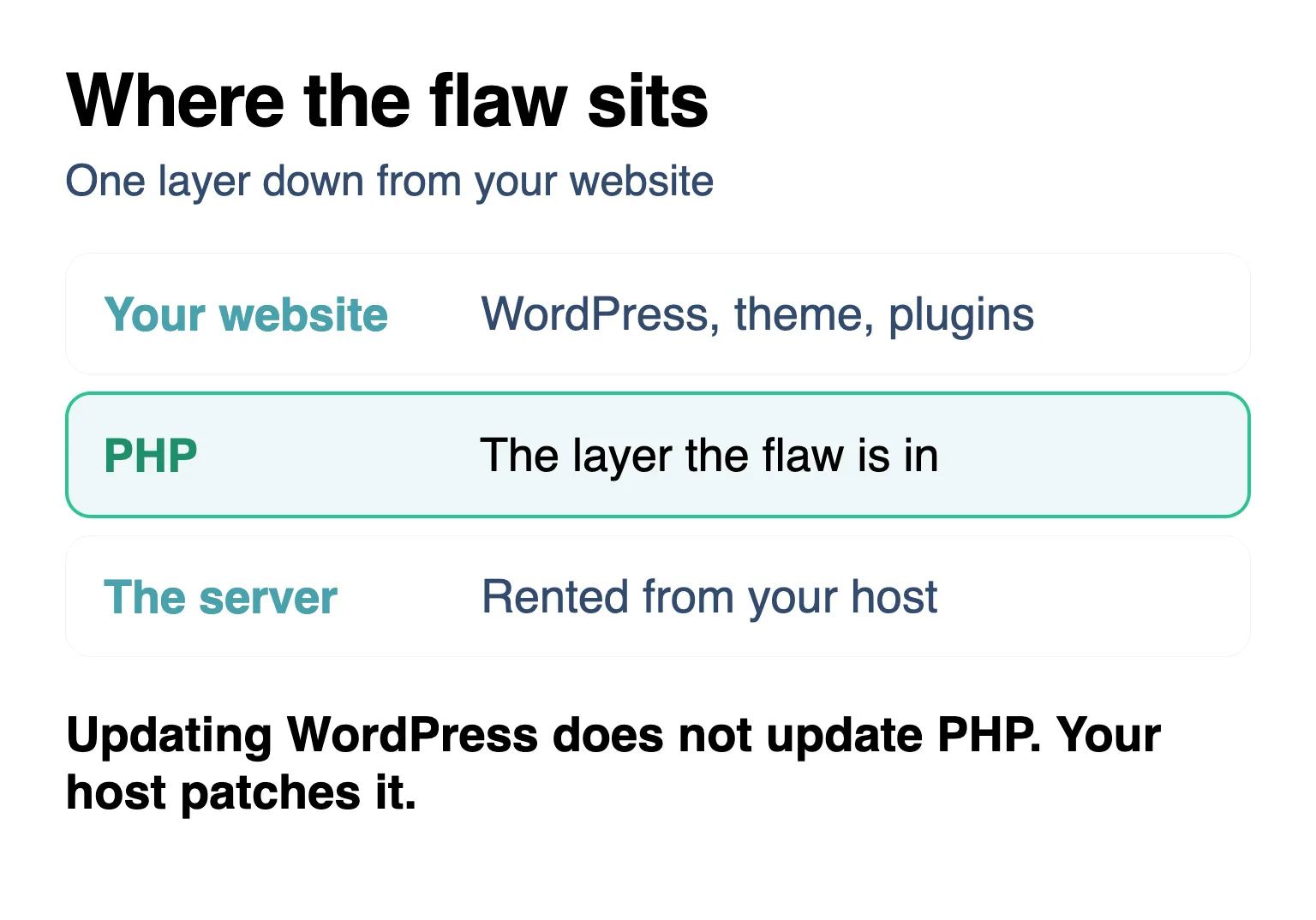
Both flaws can be triggered before any of your own site’s code runs, so it does not matter how carefully you keep WordPress, your theme and your plugins updated. The fix has to be applied to PHP, and PHP is the one part of the stack you cannot update from the dashboard. The guidance for this flaw puts it plainly. Updating an application does not update the runtime beneath it. Every release before 8.2.35, 8.3.36, 8.4.27 and 8.5.12 carries the flaw, unless a host has backported the fix into it.
The real question is not whether your plugins are current. It is who runs the layer under your site, and whether they have moved yet.
The check takes two minutes
You can see the number yourself. Log in to your WordPress dashboard, open Tools, then Site Health, click the Info tab, and look for the Server section. The PHP line shows the version your site is running right now.
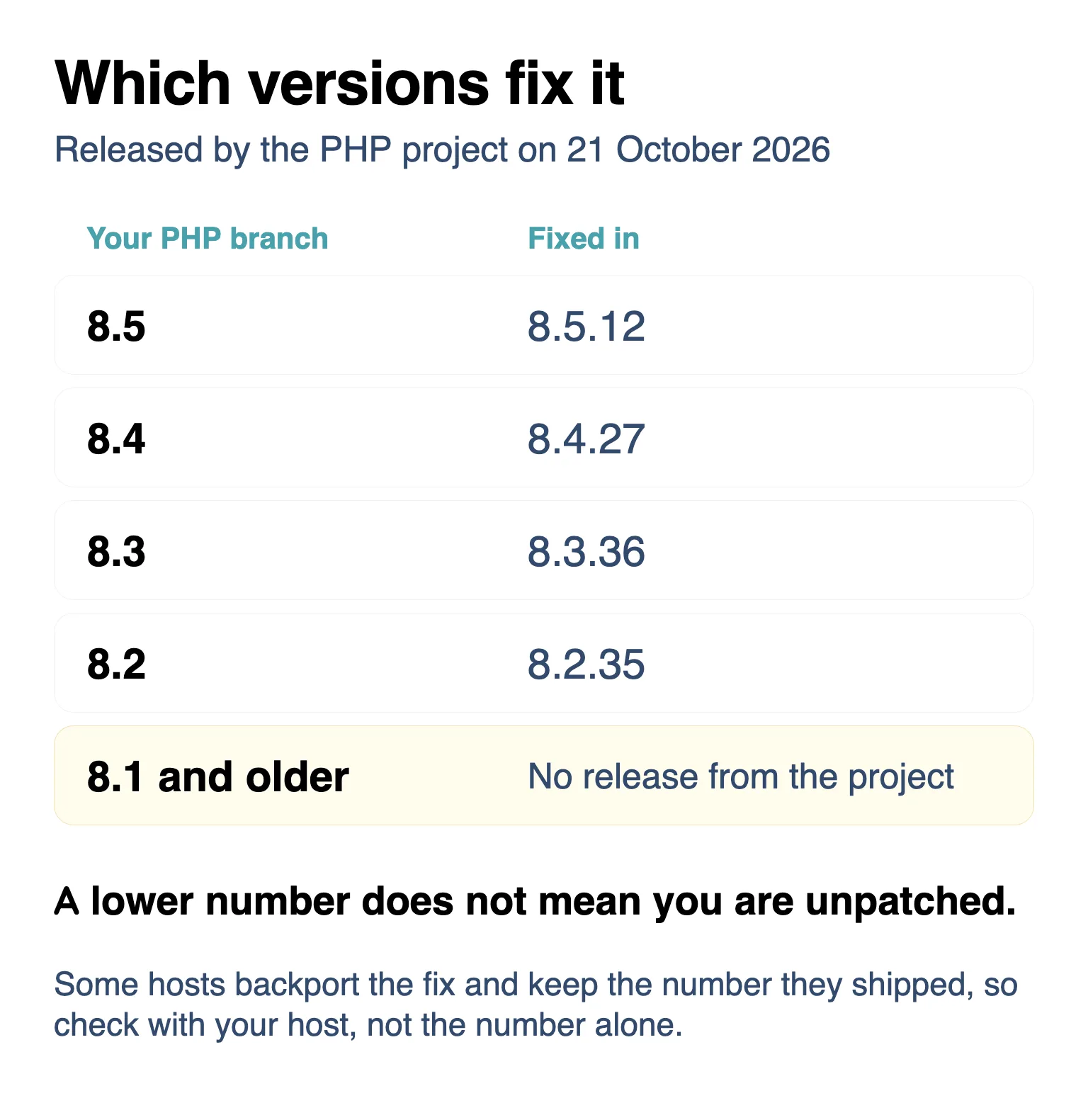
If the number matches the right hand column, or is newer, the hole is closed on your site. If it is lower, or you cannot find it, there are three things worth doing.
If we host your site, there is nothing to chase. The fix has been backported into every PHP version we offer, 7.4 included, so whichever one your site runs, it is covered, even when the number looks older than the list above.
- Ask whoever runs your server, and ask for a version rather than a reassurance. “Which PHP version is my site on, and has it been updated for CVE-2026-109618 and CVE-2026-109619?” is the whole message. On managed WordPress hosting the host applies the fix for you, and a good answer names the version.
- If the answer is PHP 8.1 or older, the PHP project has stopped releasing fixes for it. Some hosting platforms keep patching old versions themselves, so ask your host what covers the one you are on, and ask what moving up would take. Old plugins are the usual casualty of a jump, so back the site up first and look it over afterwards.
- If your host gives you the controls, you can often switch PHP versions yourself in the hosting panel. Move to the newest patched release your plugins will tolerate, check the site, then check it again a day later.
One more thing while you are in there. Take a backup now, before any changes, and another one after. If somebody did get in during the days your site was exposed, the copy from before is the one you will be glad to have.
The detail, for anyone curious
The two flaws fail in different ways. The first is about memory. When a request runs out of memory at the wrong moment, PHP can hold on to request data that is only half built, and a request crafted to exploit that can turn the mess into code of the attacker’s choosing. The second is about leftovers. When a request dies, a pointer to memory that has already been freed can survive inside the worker, the background program that builds each page, and the next request that worker handles may use it.
Two consequences matter beyond the obvious. An attacker can read memory belonging to other requests, which exposes passwords, session tokens and API keys without running any code at all, and that leaves less behind to notice. And the risk depends on how the server is set up. PHP’s advisory calls out Apache with mod_php, a common way of serving PHP pages, as the riskiest arrangement, because there an unauthenticated request can start the attack before the application is reached.
Researchers at the security company Wiz found the flaws with OpenAI and the firm Calif, using AI tools to read the code. They then demonstrated the attack against WordPress, Drupal and Joomla sites running unpatched PHP. That is why this one landed differently from a normal patch notice. It is not a flaw in one product. It is a flaw in the layer almost every product shares.
What to watch
Three things will show where this goes.
- Whether a first confirmed break-in is reported. The agencies say they have seen none so far. If that holds for a few weeks, this ends as a scare rather than a breach.
- How many servers are still unpatched in a week. The fix exists, and the flaw only stops mattering when the last exposed installation is updated. Older versions get no official release at all, so their owners have to move.
- Whether small sites are caught. The worst case for a WordPress site is easy to miss: code run without permission, database credentials read out of memory, and a site that looks normal while its password sits in someone else’s hands. If that starts happening, the advice moves from patch and watch to rebuild and replace.
Final Words
The strange thing about this flaw is where the fix had to happen. Not in the dashboard you know, not in the updates you approve, but in software you have never had to think about, on a server you rent by the month. You cannot watch that layer yourself. You can ask about it once, and you can know the answer. This is a good week to ask, because your host already knows the question.